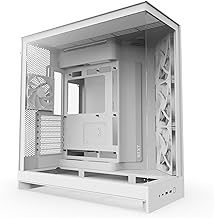
NZXT H9 Flow (2025) – Large Dual-Chamber ATX Mid-Tower Airflow PC Case – Includes 3 x 140mm & 1 x 120mm Fans – 420mm Radiator Support – Tempered Glass – Back-Connect Ready – White
NZXT H9 Flow (2025) – Large Dual-Chamber ATX Mid-Tower Airflow PC Case – Includes 3 x 140mm & 1 x 120mm Fans – 420mm Radiator Support – Tempered Glass – Back-Connect Ready – White
NZXT★★★★★4.8🔥 DEAL -$10
Mid Tower
—
Yes
435mm
—
—
$119.99
$109.99
2 stores
Specifications
Form FactorMid Tower
Max GPU Length435mm
Side PanelYes
Model #CM-H92FW-01
UPC00815671019493
Customer Reviews★★★★★4.8 · 5 reviews
★★★★★Superb Large Style ATX Mid Tower from NZXT
Purchased this for a new PC build. I wanted a larger ATX Mid tower and the NZXT H9 checked all my boxes. It is very well made, exceptional air flow capabilities. I was able to easily dissemble for my build. I upgraded all the fans so the ones that came with the tower were not used so cannot comment on them. They seemed ok.
Some of the nicer features of this tower include excellent cable routing and securing designed into the case. Given it is a larger mid tower I have lots of space for future upgrades. The additional space also allowed we to optimize the number, size and position of fans I did install. I have not had any overheating issues with this case thanks to its design.
RMK · 2026-03-16 · via amazon
★★★★★Awesome Case
Case has so much space. So much built in cable management. The aesthetics are great. Wonderfully open case for airflow and installation was incredibly easy. Got this on a sale and the value is incredible. Build quality feels top tier.
Colton Rodgers · 2026-04-05 · via amazon
★★★★★Great case at a great price point!
Purchased from Amazon refurbished and it is in mint condition! Plenty of space for any future upgrades! Space to add tons of fans and seems to be built extremely well! This case also does not have an overwhelming amount of rgb which is what I was looking for!
Troy · 2026-04-12 · via amazon
★★★★★A PC Builder's Dream
reviewing the NZXT H9 Flow (2025)
This is hands down the best case I have ever used. I have been building my PCs for over 40 years, and while the Corsair cases have been really well made easy to work on, the one my RTX 5090 is in was too densely packed to allow enough air flow. I had my system reboot several times while playing Cyberpunk 2077 because the GPU was running too hot. I decided to get the NZXT case because it has so many fans and lots of space inside for air to flow through. Installing a new motherboard was made easier because there is a little nub for the middle hole in the motherboard that makes it line up to the opening for the ports. There's enough room to top mount a water CPU cooler without the fans overlapping the board. The power supply sits on the side instead of the bottom, and that makes running cables much easier. There's lots of space behind the motherboard for hiding and organizing those cables too. Because the case fans are angled and to the side, my mammoth GPU has plenty of room around it for air flow. The only quibble I have is the fact that there is nowhere to put a GPU support. I had to settle for making the screws holding the GPU to the case very snug.
I'm obsessive about fan noise, so I am seriously considering replacing the fans that came with the case with some Noctua silent fans. They aren't bad, but they are louder than my Be Quiet! CPU cooler radiator fans which run less than 25 db most of the time. Their even louder than the 5090's fans, which run quietly even for games with intense graphics.
Highly recommended for builders.
Morris L. · 2026-02-15 · via amazon
★★★★★mostly good, but has an obvious wart
Plenty of space and excellent cable channels makes it a joy to do a PC build with this case. Case fans can be strategically mounted anywhere other than the panel doors to maximize air flow including case bottom. I am however deducting a star for the brain cramp decision to locate front panel connectors and power button at the bottom of the case. What were they trying to do, save a few cents on FP wiring length? It makes no sense. It is a major PITA to deal with these limitations. Unless you want to crouch down every time the connectors would require extension cables. The power button would require some sort of stick (I use a ruler) to reach it. Overall a good product, but NZXT did not think the front panel issues through.