Noctua NH-D15, Premium CPU Cooler with 2X NF-A15 PWM 140mm Fans (Brown)
SIMILARNH-D15S chromax.Black, Premium Dual-Tower CPU Cooler with NF-A15 PWM 140mm Fan (Black) $114.95Kraken Z73 360mm AIO CPU Liquid Cooler - Customizable LCD Display - RGB Connector - 3x 120mm Radiator Fans - White $110.10Silent Loop 3 240mm CPU AIO Liquid Cooler | 2 Silent Wings 4 120mm PWM High-Speed Fans | Quiet Performance | 6-Pole M... $119.90All CPU Coolers →PSU Wattage Calculator →
/
❄️
1 results💡 How to pick a CPU cooler
What to look for:
- TDP rating must exceed your CPU's TDP
- Socket compatibility (AM5, LGA1851, etc.)
- Fits within your case's cooler height limit
💰 Air coolers are reliable and quiet. AIO liquid coolers handle high-TDP CPUs best
FILTERS
🔍
SORTVIEWProductTypeTDP RatingAirflowNoiseValuePrice
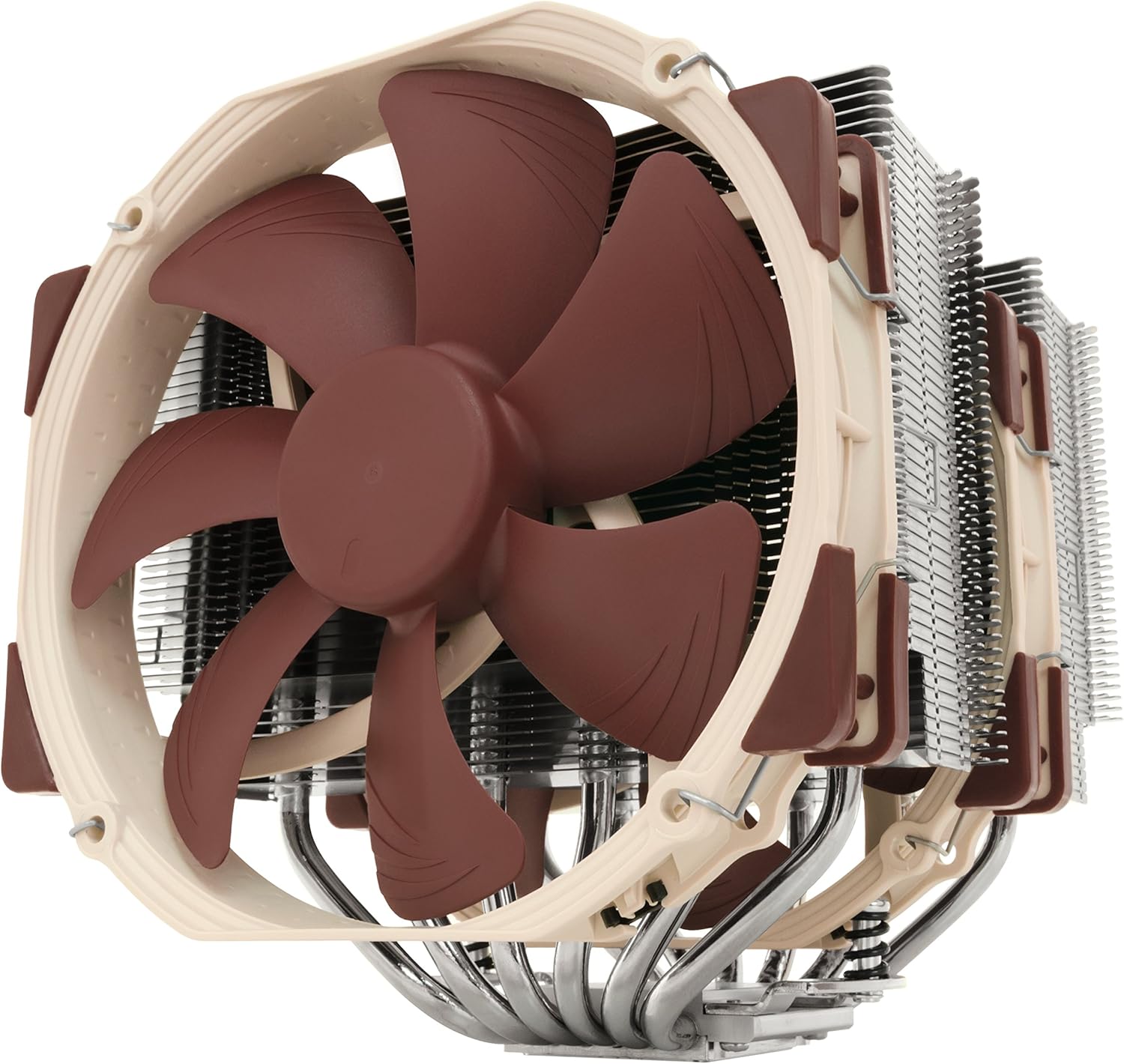
NH-D15, Premium CPU Cooler with 2X NF-A15 PWM 140mm Fans (Brown)
Noctua★★★★★4.8🔥 DEAL -$10
Air
220W
75.0 CFM
24.6dBA
Library quiet
C
$124.95
$114.95
Specifications
asinB00L7UZMAK
reviews11557
UPC807320186861803983039766842431012456
Weight2.9 lbs
Noise24.6dBA
Library quiet
CompatibilityDesktop
TypeAir
Height165mm
TDP Rating220W
Fans Included2 fans
socketsAM5,AM4,LGA1700,LGA1200,LGA1151
RGBNo
value9
Radiator140
Fan Size140mm
Airflow75.0 CFM
PERFORMANCE
65%
Customer Reviews★★★★★5.0 · 5 reviews
★★★★★Amazing Air-Cooling Performance
==================================== ===Review for 2025 (AMD AM5)=== I'll still recommend this cooler for most CPUs, and for newer gen chips you can even get the NM-AM5/4-MP83 mounting kit for free from Noctua. However, I've moved to the NH-D15 G2 LBC for AM5 and have submitted a review for that model on its product's page. ==================================== ===Review for 2022 (AMD AM4)=== Bought another one of these recently for a new AM4 build, and once more the performance is outstanding. There were minor changes to this model's packaging where they added parts for the AM4 socket. From what I understand you can also request these parts from Noctua directly with proof of purchase on an older model NH-D15. I have a higher core count on this CPU with higher clocks compared to my previous build below, and it's holding the temps between 37-53C from idle to max load. It's also nearly silent with only some very minor wind noise under load. The RAM I'm using on this build is a bit taller than I'd like, but the case does allow the secondary fan to fit just fine with the slightly added height from the fan adjustment above the RAM. I can absolutely recommend pairing this with the Fractal Torrent given its size and the overall purpose of these being air-cooling. Keywords to help searches for fitment: -MSI MAG X570S Tomahawk -Fractal Torrent (full size) -G.SKILL Trident Z Neo ======================================== ===Review for 2017 (Intel LGA1151)=== This air cooler defeated my old Corsair H100i v2 in cooling efficiency, noise, quality, and likely overall space consumption (no tubes or radiators blocking sides of the case). I'm getting at least 8-10C cooler with this thing over water and it's not even running at full speed. Not to say the water cooler was bad, but just weigh your options depending on how you set up your case cooling. Even with the slight offset of the optional fan, using Corsair Vengeance LPX sticks, I had plenty of headroom in the Air 540 even though it stated a 170mm clearance. Keywords to help searches for fitment: -Gigabyte GA-Z170X-Gaming 7 -Corsair Air 540 -Corsair Vengeance LPX ======================== ===Notes for both G1 models=== It's awesome that this thing fits so many different socket types, should I choose to switch to AMD then I don't have to buy a different kit I just change out the mounts. The build quality of the hardware is outstanding, none of the parts feel cheap or of poor manufacturing. Assembly and installation is easy to follow even though it looks way too large to sit on the socket. Some may be concerned about strain on the CPU/socket but I'd say it's comparable to some AIOs in this category, the tubes on some AIOs can absolutely put tension on the socket. If you're not concerned with the interior looks of your case then you should seriously buy this thing. If you *are* concerned with the interior looks of your case then search for the Chromax product line to compliment this hardware. If you're unsure about the optional secondary fan fitting, take a 140mm case fan and set it on top of your RAM (vertically as if it were on the cooler sitting above the RAM). If it still clears the side of your case with a few millimeters to spare then you're likely OK. Both 140mm fans are almost fully adjustable, they move/notch up and down on wire clips using the heat-sink fins as mounting points. The fans are 140mm with 120mm mounts, probably for compatibility to fit a 120mm fan as the optional for those with taller RAM. These do come with thermal paste as well.
Captin · 2017-10-02 · via amazon
★★★★★The most powerful, yet quiet, air cooler available today.
I've got two D15s and a D15S for point of reference. I'll compare it here with alternatives like the Silver Arrow IB-E Extreme, NH-U14S, D15S, Cryorig R1 Ultimate and the Dark Rock Pro 3. The D15 deserves its reputation. It is, without any doubt, the most powerful cooler for the real world. It's true that the Reeven Okeanos can keep up with it, and the Silver Arrow IB-E Extreme can even surpass it, but in the real world, owners won't put up with coolers that loud. Those two are leveraging high RPM fans to compensate for inferior efficiency, and as a result, most owners are going to clamp down on fan speed and end up with lower performance coolers. The D15 is so quite, even under full load, that inside a case it might as well be silent. Its full performance range is, thus, accessible in the real world. If you're alright with loud heat sinks, I have to imagine that using two Noctua NF-A14 iPPC 3000s would still defeat all comers. I'm not sure how well those fans would fit given the NF-A15's (stock fan) strange frame. In my view, the Okeanos and Silver Arrow don't offer serious competition for this because of the way they achieve their performance. Far more interesting, for a comparison, are its direct competition from Be Quiet! and Cryorig, namely the Dark Rock Pro 3 and the R1 Ultimate. The R1 Universal, in my opinion, is the direct competitor to the D15S, so I won't get into it much here. The Dark Rock Pro 3, while it is measurably quieter, is simply not in the same league of performance as the D15. On top of this, it's harder to install, and in practical terms, both are virtually silent anyway. The DRP3 has more in common with the outgoing D14 anyway, with its dissimilar front and middle fans for memory clearance. The R1 Ultimate poses a much bigger challenge for the D15. It is ever so slightly behind the D15, and a little louder, but in some ways it's more, and in some ways it's less, compatible. The R1 is significantly taller than the D15, so people with certain case limitations will be left out. However, it's also narrower than the D15, meaning not only is it more friendly to the neighboring PCI-E slot, it's also easier to reach down and unlock the GPU from the motherboard. Furthermore, it overhangs the memory less, although due to the way the fans are mounted, it may still have less clearance than the D15. Perhaps the R1 Ultimate's biggest weakness, relative to the D15, is the fans. The XF140s do look great and are actually quite good fans, but they're still using modified sleeve bearings that will negatively impact noise and longevity, as well as severely limit orientation (not a problem for most builds). Although the D15 is probably the most powerful air cooler ever made, at least in terms of noise levels that normal people would find tolerable, it does have several weaknesses. The first is its extreme width, which I've already discussed. On some of my more poorly spaced motherboards, like my new Crosshair VI Hero, I actually have to remove the middle fan to reach the GPU lock. The other is, I'm sad to say, quality control. I've had many Noctuas before and never found an appreciable scratch. But I've had two D15s and a D15S and all three have had minor blemishes. The first D15 had a small, but deep, scratch on the top plate/fin. The second had other, smaller scratches, although these are not really noticeable. The D15S was the worst, which had a small, but easily recognizable, corrosion spot on it, and it's being returned now. I can only guess that the increased surface area, probably about twice that of the next largest current-generation Noctua cooler, the U14S, makes it that much more likely for a scratch to occur. Still, I've come to expect better from Noctua. That said, you simply cannot find an air cooler that puts out this performance at this volume. There is almost no reason to use anything else in general. That's why it gets 5 stars. Although it's arguably the most powerful, is it the best? Probably not. I'd say that, depending on your needs, the D15S or the U14S is better. The D15S comes with only a single fan, but it moves the heat sink away from the GPU, making it easier to work on the computer and clearing the GPU on smaller motherboards. The U14S has infinite RAM compatibility on both sides, making it easier to work on your computer and allowing you to use any RAM you like. Thus, depending on which compatibility issue concerns you more, I'd go with either a D15S or a U14S. Each gives up between 1 and 2 degrees Celsius in overclocked loads, due almost exclusively to being single fan heat sinks. If you want D15 performance, simply add a second fan to the D15S, and a dual fan U14S will get very, very close to the D15. In many tests, I've ever seen dual fan D15Ses beat D15s, although it's unclear why that would be. Perhaps they're better aligned with the intake and exhaust fans in the case. Perhaps they are less affected by the heat coming off of the GPU. I'm not really sure, but suffice it to say, you can achieve D15 performance without some of the hassles of the D15. I've added photos of the D15 (non-S) with and without the front fan to give you an idea of memory overhang. For compatibility reasons, some people may decide just to go without the front fan altogether, with also works fine.
Brett Mesmer · 2017-05-11 · via amazon
★★★★★!!! Stock CPU backplate require for AM3 sockets. !!!
This is a great cooler that has a lot of little things that make it superb to all other fan coolers I've seen. It also works so well you could argue unless you are OC for super extreme numbers, its way safer than a water cooled system. So here are some general pros and cons... Cons 1. The stock CPU back-plate is require for AM3 sockets but, that isn't specified anywhere here, just in the AMD AM3 manual it comes with. I used some low profile nuts I had plus my cooler-master back-plate to hold this in place as I replaced mine long ago. You could probably find these at any hardware store so its not worth dropping stars for. 2. It is really big and probably won't fit in some mini-to-mid-ATX case. I have a pretty big 6yr old cooler-master HFX tower and it is fine. 3. The tolerance between the top of the cooler and the edge of my case is so tight that I had to use a strange "cheese knife" that has a set of hooked blades as its tip to grab the wire locks that secure the fans to the heat-sink. Pro's 1. Dropped my 3.78ghz OC FX-8300 8 core Vishera CPU from 57°c to max 39-42°c while running OCCT 4.4.1 and on Primer95. Before I couldn't run longer than 2-3 minutes before my bios set alarm of 60°c would hit while Core temp read 57°c. FYI I was using an old, cheap, vertical blowing cooler master heat-sink, w/a 2200rpm fan. 2. Very quiet, even when I tested overclocking at 4.4ghz, max temp was 50°c, the case fans and NB fan are still louder. 3. Moves a lot of air in 1 of 2 directions of your choice. The fan wire clips can be on either side of the heat sink and fan. 4. No vibration - the dark brown triangles on the fans are actually soft bushings that keep the fan housing off the heat sink by 1-2mm's 5. Much safer and less expensive than top water cooling which I personally think this competes with based on the OC I was able to do. 6. Great packaging ensures it arrives undamaged and manuals in multiple languages. 7. Comes with full back plate, nuts, and screws for 2 different Intel CPU sockets. 8. Great - 6yr warranty, responsive customer service, and many different models to choose from. My system= hope it helps MB- 6yr old Gigabyte GA-890-fxa-ud5 rev 2.1 w/ f7e Bios to run 8core AM3+ CPU's (Win10 Pro 64bit) CPU - AMD AM3+ FX-8300 OC @ 4.1ghz 1.3v RAM- GSkill Aries 2x8gb 21300 running @ 1866mhz w/ timing 8-9-9-21 1.60v GPU- XFX-HD-5830 stock numbers, never OC- replacing soon CASE- 6yr old Cooler-Master HFX full tower, 5x HD bays, 5x 5.25" bays, w/ fans= 3x 200mm, 1x140mm, 2x120mm PSU - Antec 750w
Jason · 2016-04-13 · via amazon
★★★★★Excellent product!
This is above and beyond what I expected, and is everything it claimed to be. Very well built, super quiet, solid mounting, and does the job (although I do not overclock or otherwise truly max out the CPU). I've been using it for 4 months on an Intel Core Ultra 9 285k on a MSI MPG Z890 EDGE TI WIFI7 Gaming MOBO with a Gigabyte Nvidia GeForce 5070 Ti 16G GPU.
Michael Zeleznik · 2026-04-17 · via amazon
★★★★★I never thought air cooling would work this well and figured liquid cooling was my best choice to consistently high CPU temps gi
I have had many Fans over the life of my i7 2600k. From the Stock to water cooling AIO and Custom. Believe be when I say the Noctua has done alot for my system. I never thought air cooling would work this well and figured liquid cooling was my best choice to consistently high CPU temps given the demand I have my CPU running at. With the water cooling I would run Prime95 and peg the temps at 88-90C OC'd to 4.3. I figure maybe my thermal paste was old/not applied right/whatever else. I tested with 3 different coolers multiple applications using different methods (the dot, the line) I even drained the system and added "high performance liquid. None of it helped. I broke down and began looking at air coolers. I read reviews (ALOT) and finally decided on this one. I'm happy I did. First I have built PC's since i was 16 (i'm 44 as of this writing) The other Air Cooler manufacturers need to follow suit on how to install a bracket and cooler. Installation was a breeze, They suggest removing the motherboard from the case which i scoffed at. Although i knew it would be a tight fit the bottom plate went in VERY easy. Total time of installation was less then 10 mins. Prime95 temps? 70 OC'd to 4.3 Pro: - This thing is just HUGE The size, the cooling capability, the airflow... Best CPU cooler on the market IMHO - everything you will need to hook this up is included - Contacted them asking how much a new bracket would be once i get my new 7700k. The offered me a free back when i'm ready. - Thermal paste included but was not automatically installed (love that!) -Quiet as a church mouse Con: - It is HUGE, be careful moving your desktop around as you do not want to crack your motherboard -They attach the middle fan in place. They should just leave it off as you will need to access that area. Getting the Fans back on is annoying. It's not hard but I do not have the smallest hands in the world and the tension loaded clips are tough to get a good grip in a tight space (my case and hands aren't compatible) This is a very small annoyance and not enough for me to knock a full star off.maybe just a 1/4 star. -If your into looking in your case(i'm not) you might not like the colors of the Fan's They are Tan/Beige and Brown. I don't have a window in my side nor do i care about RGB so i can handle the colors.
Joseph Martin · 2017-05-24 · via amazon
Buy Now
Amazon
✓ In Stock
$114.95
Buy →
Best Buy
Not tracked at this retailer
MSI
Not tracked at this retailer
Newegg
Not tracked at this retailer
Newegg (Open Box)
Not tracked at this retailer
VALUE SCORE
C
10.2
Average value
Performance (65%) ÷ Price ($114.95) = 10.2
S ≥28 · A ≥20 · B ≥14 · C ≥8 · D <8
S ≥28 · A ≥20 · B ≥14 · C ≥8 · D <8
💰8% off
Below MSRP
Was $124.95 → $114.95
CONSIDER INSTEAD
SAVE $94.9598% of this product's perf
Thermalright Burst Assassin 120
Price
$20
$20
+10% FASTER$90.96000000000001 cheaper
Peerless Assassin 90 SE White Dual-Towers CPU Cooler, with Aluminum Heatsink Cooling,High Perfommance PC Radiator
Price
$23.99
$23.99