💰 Air coolers are reliable and quiet. AIO liquid coolers handle high-TDP CPUs best
FILTERS
🔍
SORTVIEW
ProductTypeTDP RatingAirflowNoiseValuePrice
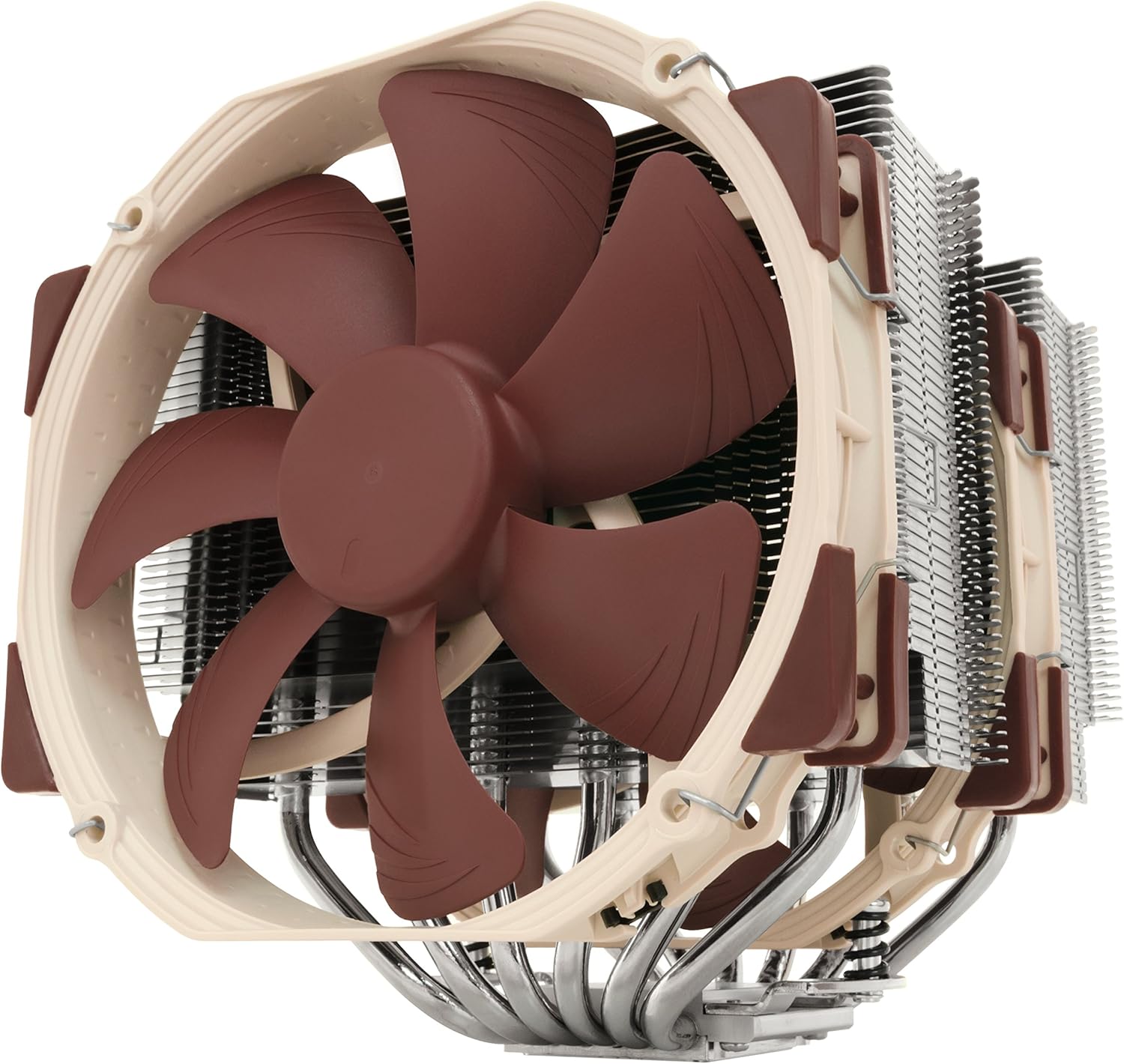
NH-D15 SE-AM4, Premium Dual-Tower CPU Cooler for AMD AM4 (Brown)
Noctua★★★★★4.8🔥 DEAL -$40Sold by Noctua Cooling Solutions via Amazon
Air
220W
150.0 CFM
24.6dBA
Library quiet
B
$129.95
$89.85
2 stores
Specifications
TypeAir
Socket SupportAM5,AM4,LGA1700,LGA1200,LGA1151
Height165mm
Fan Size140mm
Fans Included2 fans
Airflow150.0 CFM
Noise24.6dBA
Library quiet
TDP Rating220W
RGBNo
CompatibilityDesktop
Weight2.9 lbs
Model #NH-D15 SE-AM4
UPC013591084380
PERFORMANCE
87%
Customer Reviews★★★★★5.0 · 3 reviews
★★★★★Keeps my 2700x incredibly cool!
This is, without a doubt, the greatest air cooler I have ever used. My temperatures are ridiculously low, and I will give you a full synopsis later detailing the stress tests that I have run along with the max temps I have seen.
*Packaging*
Noctua gets an A+ for their packaging of this cooler. Everything is extremely organized, labeled, and they include plenty of styrofoam padding (cut perfectly to fit whatever they are cushioning) to keep things secure.
*Quality*
The product screams quality. The heatsink itself is massive, heavy, and durable. The included fans are beautifully designed and heavy duty, yet extremely quiet. The fan cables have thick covers on them to prevent any damage, and Noctua even includes a fan splitter cable and extensions to help the fans reach your motherboard header!
*Installation*
Installation was easy, but you have to make a choice on which direction you want to mount the unit. I have mine mounted horizontally (parallel to my graphics card), with the fans blowing toward the top of my case. I recommend this direction strongly, as it not only helps with any potential ram issues, BUT it gives you a huge advantage in cooling because you can then mount other intake case fans which then blast the heatsink and fins from the front of the case. In other words, I've got the Noctua fans driving air through the bottom of the unit toward top of case. I've got intake fans blasting the cooler from the right-hand side. I've got an exhaust fan pulling air toward back of case, and I've got two top exhaust fans also pulling air toward top of case. I'm hitting the Noctua with air in two directs (bottom and from the right), whereas the other two directions are pulling air out (left and top of case).
*Noise levels*
What noise? Seriously - I cannot hear the fans even at full speed. The loudest things in my case are my old HDD and my graphics card fan when it gets on full blast (1070ti). But this CPU cooler is silent.
*Warranty*
Noctua includes, IIRC, a 6-year warranty on their product. This is unparalleled in the CPU cooling world, but it is because they make the highest quality products and stand behind them.
*Performance*
Are you ready for the numbers? I have run gobs of stress tests and the results are stunning. I use HWInfo (tdie) temps or HWmon which report the same numbers.
Test - Max Temperature
Aida64 for 10 minutes - 50c
Cinebench - 58c
Prime95 (small FFTs for maximum heat) for 20 minutes - 69c
Idle temps are around 29c. Day-to-day use keeps me in the 35c-45c range (chrome with lots of tabs, excel open, etc.) If I am gaming (playing Overwatch on epic settings), I can hover around 39c! 39c while gaming and listening to music in the background is pretty stellar in my opinion. I am also particularly impressed with the Aida64 stress test - this was 100% cpu usage for 10 minutes and the max temp was 50c. It is far and away the most realistic stress test, as prime95 temps will never happen in the real-world.
*How to maximize performance / My setup*
I use a full ATX case. I have a total of 9 fans inside my case, which I will explain now:
4 fans push air from front of case to back of case (intake fans)
2 Noctua fans push air through heatsink fins from bottom to top of case
1 exhaust fan pulling air out back of case
2 exhaust fans pulling air out top of case
The important factor is to target all the air in one or two directions. Intake is very important - you want air rushing into your case, and you want more intake fans than exhaust. Bear in mind, despite 9 total fans my rig is virtually silent. You can tell it is on, but just barely. If gaming / listening to music or wearing headphones, you hear nothing.
The key is to maximize air intake and to target the Noctua device. Use just a dab of thermal paste (I used the included Noctua paste) in the center and then gently install the Noctua on top of your CPU. I no longer believe in anything other than the dab of paste in the center (no spread it around, no X pattern, etc.). People use way too much thermal paste, too. Just a little tiny dot, smaller than the size of a pea in my opinion, is good.
*My rig*
Phanteks Enthoo Pro Series PH-ES614P_BK Black Steel / Plastic ATX Full Tower Computer Case
ASRock X470 Master SLI/AC AM4 AMD Promontory X470 SATA 6Gb/s USB 3.1 HDMI ATX AMD Motherboard
AMD Ryzen 7 2700X Processor with Noctua DH-15
Team Dark Pro 16GB (2 x 8GB) 288-Pin SDRAM DDR4 3200 (PC4 25600) Desktop Memory
Geforce 1070ti 8 GB
ADATA Ultimate SU650 3D NAND 2.5" 480 GB SSD
Thermaltake Smart Pro RGB 750W PSU 80 Plus Bronze Fully Modular Power Supply
upHere Computer Case Fan 120mm LED Silent Fan Triple Pack Colorful Case Fan (just some of the fans in my rig)
Phantom-X · 2018-06-18 · via amazon
★★★★★Its the small things that really matter ... 5 stars
My full experience + word on ram and case compatibility. (Will update as time goes on, go below for updates)
My Specs: Case: H440 Board: Asus VI hero am4 CPU: Ryzen 1800x
I'l start off by saying the moment you see the box at your door, it just looks like quality. The box's outside graphics are sharp and the texture is the quality that you find on water resistant boxes, this is an important and often overlooked part of a purchase experience.
Opening the box you'l find everything (+ THERMAL PASTE) neatly and densely packed inside with no room to wiggle which ensures good shipping protection and efficiency, its what I'd compare to "Apple product boxing", 5 stars there.
Each box is labeled with whats inside, with BY FAR the best and clearest instructions you'l ever receive printed on premium glossy paper. Quality instructions with detailed photos and step by step guides that include more info then just the basics, but tips as well for beginners.
Lastly the hardware itself, well built and tested by many, this air cooler is on par or better than AIO liquid coolers. Its the best and safest air cooler to go with, granted you have the space for it in your case. It is very large. Something worth noting is since the fins are cut at the bottoms for ram compatibility, it made the perfect holding area for my fingers for picking up and placing the cooler down on the CPU, it might be a coincidence but you'l find it very useful and wont cut up your fingers bad like with all those other air coolers.
I have no problems with CPU temps 30s in idle and 60s-low 70 extreme load, high 50s in normal gaming conditions. No worries there.
Color theme: I can't knock a star off and blame noctua on this, they have been using this tan/brown color theme for a LONG time, so its no surprise to anyone but it most likely will not fit any color theme out there. If you're all about the look of your PC and use a window, you can save some money and order the 1 fan version of this cooler, then just replace the fans. I personally have no window, so my case is all black all sides so it doesn't matter what the inside looks like.
* RAM Compatibility - I was using corsair dominator platinum ram, some of the tallest on the market and the cpu cooler fins clear the top by about third of an inch - more than i thought it would. This CPU cooler will certainly clear any ram you may use. HOWEVER, due to my ram height, I could not mount the fan over the ram because the height of the ram was pushing the fan into my case panel so i couldn't close it, so I had to place the 2nd fan on the other side in the rear near the exhaust, which is okay, but keep in mind shorter ram will allow you to put the fan over top of it and have clearance in most mid tower cases (deff in h440 cases).
GPU Compatibility - Check Noctua website for the long list of motherboard compatibility, it will explain this and covers 99% of EVERY motherboard out there. Normal air or blower style GPUs will fit fine in 1st PCIE slot with the air cooler sitting very close to the back plate, although if you have water cooling where the tubes come out the the GPU (upwards towards CPU) it will not fit, but then again i dont see why someone would air cool cpu and water cool a gpu, they would probably water cool both and this wouldn't apply anyways.
CONCLUSION: If you have the space for it and don't mind the classic noctua brown, this is the best quality CPU air cooler you'l find for this price. 5 star quality inside and out, from the box, packaging, instructions, and the hardware.
05-12-2017 UPDATE:
In pull configuration with these fans, they are very noisy due to the turbulence from the cooler fins so close. I found out these were more designed for PUSH not pull. Its very noisy in pull so do not arrange them that way.
05-13-2017 UPDATE: Despite only running 1 fan in the center in push towards the rear exhaust, i get 72 Celsius max at 100% load on all cores for 10 minutes. It appears this cooler only needs one fan to function well and the 2nd is optional.
05-15-2017 UPDATE: Honestly after using it for a week and having to move some things around, it really is a headache to try to move around this giant cooler. My h440 case space inside is very tight because there's a hardrive wall on the right side, so if you have a h440 i do not recommend this cooler. I pretty much cant work on the inside unless i take the cooler off. I feel like notcua could have made it a little smaller and it would have performed the same or so close it wouldnt matter the difference. Overall still a 5 star cooler, but will give you some headaches due to its size, but all the specs are listed, size and all on the website so i cant knock a start because its out there. I think im going to try switching the orientation front the side ways to vertical and blow the air out the top of the case and see how that works.
Dakota · 2017-05-12 · via amazon
★★★★★As good as my old AIO Water Cooler
Pros: As far as performance, it is doing a great job keeping my Ryzen 5 1600x cool while gaming but my case has lots of in-flowing air due to multiple 120mm case fans so your mileage may vary. While not perfectly silent, it's really quiet and shouldn't be noticeable to most people. During gaming sessions my processor never heats up above 41c, and that's with a mild overclock using Ryzen Master. That's right on par with my old AIO water cooler, before it leaked all over my video card! Installation was a breeze! Seriously, I don't understand how anyone could have trouble discerning the instructions. It even uses the original backplate so you don't even need to remove the motherboard to install it. It took me 10 minutes to have it installed and running.
Cons: This thing is HUGE. No, you don't understand until you see it in person. It takes up every bit of free space in my case and I'm using an Antec Lanboy Air case which is a pretty big case. I had to change the fan orientation to 'pull' as 'push' orientation wouldn't fit due to one of the fans being blocked by my memory heat-sinks, but that was no biggie and it wasn't hard. Maybe the biggest con is the absolutely AWFUL paint job on these Noctua fans. Why on earth aren't they black or white or red or something that works inside a modern-day case? Barf-beige and poop-brown just doesn't go with my color theme. But I knew this going in so I won't take a star away because of it.