Switch type (linear for gaming, tactile for typing)
Layout (full-size, TKL, 60%, 75%)
Wired or wireless with battery life
💰 Try switches in person if possible. Hot-swappable boards let you change later
FILTERS
🔍
SORTVIEW
ProductSwitchesLayoutWirelessValuePrice
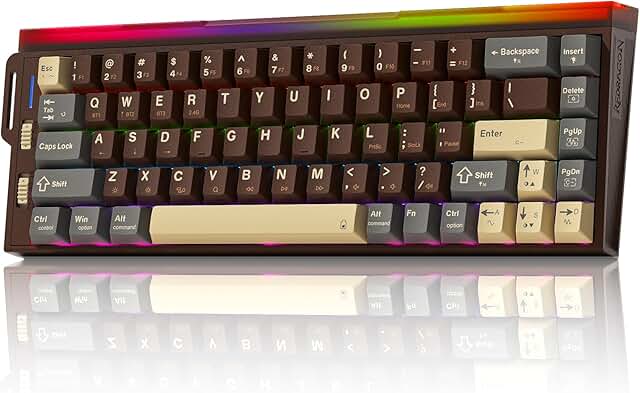
Redragon K752 Wireless Mechanical Keyboard, 60% Gasket Mount Gaming Keyboard with RGB Backlit, Creamy Sound, Tri-Mode 2.4GHz/BT5.0, Hot-Swappable, PBT Keycaps for PC/Mac Gamer
Redragon★★★★4.3🔥 DEAL -$10Sold by Klymra Shop via Amazon
—
60%
Yes
—
$49.99
$39.99
Specifications
Layout60%
WirelessYes
RGBYes
Customer Reviews★★★★★4.7 · 3 reviews
★★★★★A compact keyboard that punches way above its weight
I'll be honest, going from a full-size keyboard to a 60% layout had me nervous. But after a few days with the Redragon K752, I'm a convert. The space savings on my desk alone made it worth the leap, and I adapted to the compact layout way faster than I expected.
The keystrokes feel incredible. There's a satisfying, creamy mechanical feel without being obnoxiously loud, which is a big deal when you're on video calls. If you've been suffering through mushy membrane keyboards, this thing will change your whole typing experience. The key travel and feedback are just spot on.
Now, the backlighting. I work in low light constantly, and my eyes aren't what they used to be, so the RGB backlight is a genuine game-changer, not just eye candy. Even better, the key legends are backlit, which means they shouldn't wear off over time the way printed keys do on cheaper boards. There's also a really cool motion detection feature: the backlight shuts off when you step away, then lights right back up the second your hands hover over the keys again. Slick little touch.
Battery life? Weeks of heavy use before I even think about charging, and USB-C makes topping off quick and painless. You can also turn the keyboard fully off when you're done for the day, which is a nice option to have.
The tri-mode wireless (2.4GHz, Bluetooth, and wired) has been rock solid for me. No lag, no dropout, no drama. I love that you can pair it with multiple devices and switch between them on the fly.
Build quality feels premium and sturdy. The PBT keycaps, the gasket mount, the hot-swappable switches... this isn't some flimsy budget board dressed up with RGB. It's a genuinely well-made piece of kit.
One minor gripe: the function row sits right above the number row with almost no gap, so it's easy to fat-finger the wrong key. I hit the lock key instead of the minus key more times than I care to admit. But once I remapped that one annoyance, problem solved.
If you're in the market for a compact wireless mechanical keyboard that doesn't compromise on feel, reliability, or looks, this is the one. Worth every penny, and honestly, I'm tempted to buy a backup before they stop making it.
Amazon Shoppper · 2026-04-04 · via amazon
★★★★★SEEMS WELL MADE, 3 WAYS TO CONNECT, SOFTWARE IS AVAILABLE NOW
Item ordered: Redragon K752 Wireless Mechanical Keyboard, 60% Gasket Mount Gaming Keyboard with RGB Backlit, Creamy Sound, Tri-Mode 2.4GHz/BT5.0, Hot-Swappable, PBT Keycaps for PC/Mac Gamer
Summary: A decent 60% (no keypad) rechargeable mechanical keyboard with three ways to connect.
SOFTWARE IS AVAILABLE:
Some of the other reviews say there is no software. This was true when I first received the keyboard. This has since been remedied. Search the product listing page for "Driver download" towards the end of About this item, and copy paste the URL, which will take you to page on Redragon's web site.
On that page, scroll down for "Manuals and Software" and you will see two links. One for the driver zip file and one for a PDF of the manual.
Later this keyboard may be added to their regular product page so look there if you this info is no longer valid.
The PDF of the manual (folded paper) that comes with the keyboard can give you more details on how to control the lights and stuff but I'll hit a few points that might not be obvious:
General dimensions are roughly 12.75" x 4.75" and it weighs about 1 pound 10.5 ounces
The lower left slider switch is 3-way. Bluetooth, USB wired, and USB wireless dongle. If the USB cable is unplugged, the middle position doubles as an off switch. Like if you wanted to clean the keyboard or swap keys and wanted it off.
The USB dongle stores in a small hole on the left side of the keyboard.
They keyboard comes with an optional hand strap that attaches to the left side if desired. Also three extra key mechanisms and a USB cable.
To use the software to remap keys or change the lights, the keyboard must be connected to the PC via a USB cable. That's just while configuring. It can be set back to wireless after setting it how you want it.
When I ran the software it also downloaded and update of the latest firmware to the keyboard.
It is possible to turn both the lights under the keys and the light bar in the back completely off.
They look nice, I just prefer no lights.
When the lights are disabled, the under key lights still flicker briefly when the keyboard is turned on to give a visual response.
The keyboard has a solid feel, if a bit heavy, and seems to be well made.
I'm still getting used to the 60% format but that's on me since I've mostly owned full sized keyboards.
You can also adjust the lights and a few other features using key combinations on the keyboard instead of the software. These are described in the instruction paper that comes with the keyboard. The print size of the instructions is pretty small. For my eyesight I found it easier to download the PDF version and use that since I can enlarge the size.
The only complaint I had was the lack of drivers and instructions in electronic format, and as I mentioned above, those have both been addressed and are no longer an issue.
Justa User · 2026-04-13 · via amazon
★★★★★Very nice compact mechanical keyboard
Easy to connect to my computer, holds a charge for a few days with regular use and remains easy to use even when charging. Have tried connecting the keyboard via Bluetooth or the radio dongle successfully so have had no issues whatsoever with connectivity. During use, it sounds like a typewriter when typing just like you'd expect from a mechanical keyboard.
I like that the keys come off easily for an interchangeable look. Removability of the default keycaps is a breeze with the included removal tool. The default layout is also very colorful, although my one issue is the keycaps don't light up, even if you replace them with clear ones. I was hoping the light would come through the letters and numbers on my own set.
This gamming keyboard replacing another other more compact version from the same brand. I have to say I prefer the 60% size as I like having the little arrows. Reddragon is a reliable brand whom I've purchased from before and would again as they are trustworthy. The keyboard feels sturdy. Its heavy but not in a bad way. I've used very light keyboard which are flimsy, while this one has substance. Overall, a great keyboard for the price.