Panel type (IPS for color, VA for contrast, OLED for best image)
💰 Sweet spot 2026: 27-inch 1440p 165Hz IPS. Under $300 for great quality
FILTERS
🔍
SORTVIEW
ProductScreenResolutionRefreshPanelValuePrice
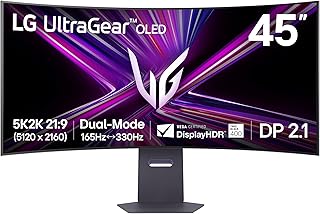
LG 45GX950A-B 45-inch Ultragear 5K2K WUHD (5120 x 2160) OLED Curved Gaming Monitor, Dual-Mode, 165Hz, 0.03ms, NVIDIA G-Sync, AMD FreeSync Premium Pro, HDR True Black 400, USB Type-C 90W, DP2.1
NVIDIA★★★★4.2🔥 DEAL -$285Sold by Video & Audio Center - Same Day Shipping via Amazon
45"
—
165Hz
OLED
—
$1884.97
$1599.99
Specifications
Screen45"
Resolution4K
PanelOLED
Refresh165Hz
CurvedYes
Customer Reviews★★★★★4.0 · 5 reviews
★★★★★Best Monitor of the Year
This monitor is freaking awesome! If you’ve seen the first Incredibles where Mr. Incredible sneaks into Syndrome’s Computer? This monitor feels like that. A Goliath monitor. It’s insanely spacious. The 5K2K resolution is beautiful. Colors are beautiful, bright, and accurate on that OLED display. It’s expensive, but worth it. I use the USB-C cable for my Mac, and the DisplayPort for my PC. All working seamlessly. This is definitely the monitor to get. Insanely smooth too with the high refresh rate.
David Schloemer · 2026-01-02 · via amazon
★★★★★This monitor is amazing; pros/cons for non-professional users
I've been using it for 4 months now and when I first set it up, it was stellar. The difference was incredible. It's very immersive and just a great screen. I'm not going to go into all the details that others do, but I'll highlight a few things: Pro: - It's big. The curvature is just about right if you're about 3 feet away. - The HDR is a nice change and very noticeable. - Refresh is fine - 165Hz is more than enough if you can push it there. - 2 HDMI, 1 DP, 1 USB-C is nice. - I get 165Hz with both DP 3M (what is now Green Jiss CABLE-54532587 (?)) and HDMI 2M (Ubluker UB222) cables from Amazon. - USB-C port provides power/video to a MacBook, if that's what you're using. - It's packed very well (and huge, as you would expect). Con: - Other reviews mention not coming out of sleep. I had the same issue. I just changed the settings to not go into deep sleep and it's been fine. - Would have preferred a different way to switch between inputs than pulling up the menu with that small nipple-like joystick. I imagine that it will eventually fail. - Firmware update is a mess to do. Don't know if I needed it or not but did it anyway (the sleep issue noted above). - The USB-A ports on the monitor are only fed by the USB-C input. Kinda disappointing. If you have a MacBook attached via USB-C but want those USB-A ports for a different machine, nope. - It's big (pro and con depending on your setup). I think the USB port thing is my biggest gripe. Would be nice to have the USB-C video but not have the USB-A hub/ports tied to that input. One more USB input for the hub with a toggle on which to use would have made it perfect. Anyway, overall, I can ignore the cons and say that this is an amazing monitor.
Gregmo · 2026-05-02 · via amazon
★★★★★I was blown away,going from Alienware 3225qf
So far it's a great monitor. So first of the sound.... Never had a monitor with speakers but these are loud and sound good. Not great like a headset but good enough when you want to give your ears a break. They are a little muffled due to beaing in the housing. Picture quality... It amazes me at the quality and sharpness of games even on 2560x1080 330hz mode. I have always wanted a widescreen 4k monitor when I seen this at another store on display I had to try it especially when it was on sale for 25% off. It didn't look as good in the store as it does at home. Search online for the best color settings and this monitor will surpass the DW3225qf in gaming. On paper the colors of a WOLED aren't as good as the QD OLED, but if you only use it for gaming that won't make a noticeable difference. The colors are still vibrant even in hdr. Final thoughts.... For some reason gsync doesn't work on the 3225QF as well as this monitor. Games at 240hz on the 3225QF had stutter and tearing. All the games I tested on this monitor are silky smooth. At 2560X1080 Battlefield 6 runs at 600 fps, almost 2x the refresh rate, but it's still smooth and no tearing. This is an amazing widescreen monitor I am glad I purchased.
Redmon · 2026-02-19 · via amazon
★★★★★Shows adds on the home screen and hard to turn off
Displayed a ad for an insurance company on the top of my home screen on my freaking PC monitor by default. Had to go through several menu layerrs to turn off advertisements. Not acceptable shame on LG Gemini said It is frustrating to see ads on a high-end OLED, especially when you're using it as a computer monitor. LG has recently expanded its "ad solutions" to include home screen banners and even screensaver ads. Since most LG OLED monitors (like the UltraGear series) now run a version of webOS, you can disable these by diving into the system settings. How to Disable Ads & Recommendations Open Settings: Press the Gear icon on your remote or use the joystick on the monitor to navigate to the All Settings menu. Navigate to Home Settings: Go to General > System > Additional Settings > Home Settings. Toggle OFF both Home Promotion and Content Recommendations. Disable Screensaver Ads: In the same Additional Settings menu, look for Screen Saver Promotion. Toggle this OFF to prevent ads from playing before your screensaver kicks in (which is also better for preventing OLED burn-in). Limit Ad Tracking: Go to General > System > Additional Settings > Advertisement. Toggle ON the option to Limit Ad Tracking and select Reset Advertising ID.
James Harren · 2026-03-14 · via amazon
★★★★★Blows me Away But Has Problems
First let me start off by saying congratulations if you are reading this review. You are looking at a product that is truly something special. A 1700$ monitor is pretty wild when you think about it. Personally, I can't afford it but I bought it anyway. Why you might ask? Because I only buy the best for myself despite being low income. I felt this monitor would be keystone to the PC I built in November where again, I spared no expense. My initial reaction to this monitor was dear God please don't let me break it taking it out of the box. The screen bezel is very small and you dont want to be wrapping your fingers around this monitor. Bad things will happen. Once I read the extremely vague and poorly translated instructions(More on this topic later) I had the monitor on the desk without having anything bad happen. I felt lucky this was the case. The way this thing was packaged felt like an accident waiting to happen. But I digress. On to the good stuff. The monitor is absolutely stunning and beautiful and almost every imaginable way. Visually it has me looking up from my pillow at night thinking "Damn Daniel." Once properly set up I soon realized I was dealing with a huge leap forward in picture quality and color representation from my nearly 13 year old 1080p BEN Q monitor. I mean...Que Owen Wilson Voice here..."WOW" Its gorgeous. Gaming has been super fun on this bad boy (Or girl) not sure what the monitor identifies as. Personally I believe the finest things in life are female. Like a ferarri. Ya that's right. This thing is a Ferrari of monitors compared to the Lexus I had been using for so long. But I feel there's some things I'm a little worried about. Here are some of my negative things to say and this is why it's not a perfect 5 stars. The documentation with the monitor seems very lacking. I didn't find a real owners manual explaining things in great detail. I even looked online and that also wasn't anything impressive or super helpful. I'm trying to better understand what it means to own an OLED. A type of screen known for it's issues with Burn in. That's right. The documentation is vague and unhelpful when it comes to burn in. They have no problem saying they won't cover burn in with their warranty but it's ok for the consumer to drop nearly 2 grand on something with a user manual translated by God only knows. LG your "Long periods of time" advice for preventing burn in is very vague in my opinion. You should also offer burn in protection. Im not talking about the obvious situations. I dont expect to have a monitor replaced if I freeze frame on Pedro Pascals face for 12 hours and it destroys the screen. But this is a gaming monitor. I dont play a single game that does not have static HUD elements present. These are objects which do not move or go away during play. How long until one of these in game elements damages my gaming monitor? I only have a vague answer for that. Big Problem. Additionally is seems like cleaning this thing is going to be interesting. The monitor has technologies for keeping it healthy, but again; The information on them and how often they should be run is pretty vague in my opinion. In closing, this is a fantastic product that I have my fingers crossed that it works out to my expectations. So far is has only impressed and changed my opinion completely on curved displays and 1440p resolution gaming. I hope if you order one it comes in good condition. My box was a little banged up and that had me worried but alas all is well so far. Only time will tell whether I made a good choice in going with an OLED or if I have doomed myself by spending so much on a monitor that wont make it 13 years like my 600$ LCD. To anyone who braves the water and buys one I wish you all the luck. Fly safe.