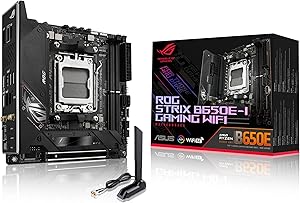
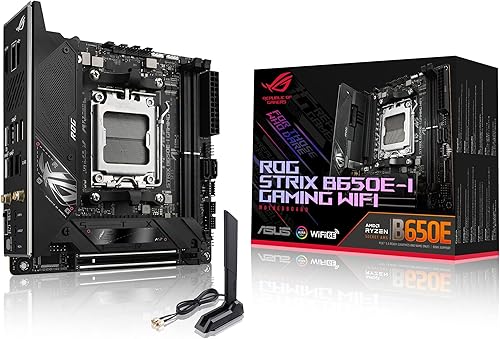
* Memory Speed is the max supported by this motherboard. Actual speed also depends on your CPU's memory controller and RAM kit rated speed.
PERFORMANCE
83%
Customer Reviews★★★★★4.0 · 5 reviews
★★★★★One of the best AM5 motherboards that is worth its pricetag
One of the best AM5 motherboards. Great VRMs to power any AM5 processor, nice selection of ports including 2 USB-C ports. Booted right away without having to do a BIOS flashback and its been running perfectly fine with my previous components. BIOS UI is easy to follow and allows for PBO/Overclock and Undervolt. Read about coil whine issues but after 2 weeks of use mine stays completely silent. Great value.
Lucas Di Donatis · 2026-05-01 · via amazon
★★★★★Stability
If you are looking for a stable chipset and feature packed mini-itx board, this motherboard is the way to go. Easily one of the best AM5 motherboards. Plenty of high speed USB ports, easy to update the BIOS via flash back, and PCIe 5.0 slot!
Miguel Echeverria · 2026-04-24 · via amazon
★★★★★It's a good board but it DOES boot slow. And Bluetooth is weak and disconnects.
Pretty much my only complaint is that it boots slow, as others have said. It takes like 5 seconds to display the BIOS, so it's really only a problem if you're going in and out of the BIOS a lot. Otherwise, it really won't bother you. But it probably will bother you if you need to do extensive BIOS troubleshooting. I only had to go into the BIOS a few times and was getting annoyed. I also didn't know that with AM5 the backplate is typically attached to the board, so I bought the wrong heatsink at first. Just make sure you buy a heatsink that is made to attach to the AM5 bracket and doesn't REQURE it's own (like some do), and you'll be fine with this board. If you don't know these things ahead of time, it can be a pain, though. Also, remember to pair this with a CPU that has enough lanes to support a full x16 graphics card and NVME drive, or the GPU may run at half speed. I paired this with the 7950X3D and a AXP120-X67 Air Cooler, and RTX 4070 12GB (I get like 20K in Time Spy, so it's not a bad board). That's about it, I think. Oh, and the onboard Bluetooth sucks (but it does on most motherboards, from my experience -- they really need to put in better adapters, IMO). It's a good board, but DOES boot kind of slow, but it's only a problem if you go into the BIOS a lot or start having problems and need to start doing that. Oh, and I almost forgot -- Windows 11 setup didn't recognize the network adapter right away (which is a problem during setup because it needs a network). So, I had to enter special commands during setup (found online in Microsoft's help docs or Google). It probably deserves a star off for it booting slow and the network adapter not working during Windows 11 setup, but since I had zero problems with it other than that, I'll give it a 5 just because it works so well than those two things (besides those two things I'm very happy with it, and I even bought another which I just put together).
Amazon Guy · 2024-11-19 · via amazon
★★★★★Decent MB, but poor compatibility
The vast majority of PC users don't need anything more fancy than this. Indeed, they don't even need something as fancy as this. PCIe 5 is overkill and only the most extreme of GPU or parallel storage use cases will come even close to saturating those pipes. But, it does make this MB a candidate for future-proofing since AM5 is going to be supported by AMD for a while, PCIe 5 will unlock more usecases that software and hardware will take advantage of, and DDR5 will eventually come down in price. It's certainly why I got it. I don't want to upgrade my MB for the next 5 years or so and I think this is a good board to do that with. The MB has a USB-C DisplayPort slot which is useful since most new monitors support it and it's a lot easier to use than standard DP which you would presumably plug into your GPU. The built-in sound card is good enough. I don't have any objective way to measure it but I used to be a musician and the music I'm playing on my backup set of speakers sounds fine. The fact that my desk is too small for my massive monitors is the most glaring source of sound quality issues. There's a lot of drama around AMD's AM5 chipset, fried CPUs, and an all-around mess. This board is no exception, but I haven't had any big issues so far. There is a BIOS update (non-beta) to limit Vsoc to 1.3V, but that isn't a complete fix for all issues identified so you should leave all settings default and auto and turn off the computer when you're done with it. DDR5 compatibility is quite low. Anecdotally, there are many who can't get sticks on the QVL to work correctly, but I think the main issue is that they don't work with EXPO or non-default settings. At regular speeds I got my sticks (Kingston 64GB 4800, KF548C38BBK2-64) to work. Maybe you will as well. It's very apparent that ASUS had a hard time getting many of their AM5 boards to work with DDR5 sticks. Product physical build quality seems high. It has a stiff heft to it that makes you think it's quite solid. Of course, I don't know how strong it actually is since I didn't want to break it. The reinforced PCIe slot is welcome since I have bad memories in a previous build with a heavy GPU causing problems. The front M.2 slot has some included heatsink and thermal pads which is useful if you have a really high speed SSD you need to cool down. I don't think it's necessary for PCIe 3 SSDs, but it's probably needed for PCIe 4 and 5 ones if you have high utilization (no idea how a casual person would achieve this, but it might happen). The back M.2 slot is just a slot with a Q-latch which is just a captive screw with an extra semi-circle of material to latch the M.2 stick in. Nothing fancy, doesn't need to be. One issue I had with installation was that my GPU's backplate made it impossible to use all of the front panel wires since there was not enough space to accommodate the plugs. I still had enough to handle the Power LED and Power Button, but left the others unused for convenience.
Justin · 2023-05-15 · via amazon
★★★★★Horrible Product from an equally horrible company
I won’t go into detail about ASUS the company, there is more than enough details online, but I will go into detail in regards to the B650E-I. The first problem that I got was the fact that there are no Internet drivers preinstalled onto the motherboard meaning that you have to save your Internet drivers onto a separate USB before you actually get even LAN working. This is a problem because if you are like most people, you will be reusing part from your previous build and will not have a computer to actually download the drivers until it is already too late. I was fortunate enough to have actually done this however it shouldn’t even be a problem, yet it is. The second issue is the boot times last substantially longer than any other motherboard that I’ve used before. The third issue is going to be the fact that there is coil wine on my unit. It’s not entirely audible, only noticeable if I have my fans at a low speed and the case panels off, however, based on previous reviews, it is likely that this will get worse overtime and I have purchased motherboards for 1/3 of the price that had no coil line. The fourth and final problem, which is the most important for me is that the audio solution on this motherboard is absolutely horrible. For whatever reason the audio signal that comes out of the rear is incredibly loud, it distorts my headphones even at 50% system volume on windows. There is a lot of distortion and the audio sounds tinny, installing the drivers from the ASUS website does not help. This is not an issue that I have seen substantially covered at all except for one Reddit thread, this in my opinion, makes the board unusable and even though you can compensate by reducing your system volume it is common for volume to reset on startup and it shouldn’t even be an issue in the first place. Yes, the motherboard does have many good features and the rear Io is best in class and there are no extra daughter boards that you have to use to get full features like other manufacturers, but it is not worth the price nor the quality. EDIT: Some extra info. - Coil whine can be “solved” by keeping your CPU above 1.2V at all times. Should not have to do this for $300. - Long boot times are a problem with AM5 in general apparently. Go into your BIOS and turn on BOTH Memory Context Restore AND Memory Power Down. ASUS BIOS should do both automatically when one is enabled. Fast boot helps as well, 13second boot times. - Audio is done by Realtek ALC4080 which does audio over USB and has “impedance detection”. This does not work. It detects 80ohm headphones as over 1000ohms, massively over amplifying the signal. Realtek audio drivers (not Microsoft defaults) and Realtek Audio Console must be installed to manually change amplifying level, but ohm detection is still wrong. This fixes sound level, but ALC4080 implementation and noise isolation is still bad. Get constant crackles during any bass notes above 50% volume. Especially when CPU utilization or Ethernet utilization is high due to bad isolation. Stick to motherboards that use ALC 800/1200. I will be returning this when the ASRock B850 boards come out.