* Memory Speed is the max supported by this motherboard. Actual speed also depends on your CPU's memory controller and RAM kit rated speed.
PERFORMANCE
100%
Customer Reviews★★★★★4.0 · 5 reviews
★★★★★Muy Bonita
Llego en perfecto 👌 estado, aun no la he probado porque estoy comprando las piezas por partes para armar un PC para edición y gaming pero el paquete llego bien y a tiempo y además es una board muy estética y se ve muy bien
David A. Cohen · 2026-05-07 · via amazon
★★★★★Reliable
Excellent motherboard for it's price point. Previously owned an Asus creator motherboard and it started to freeze my videos. Upon changing to this all my issues were resolved. Asus is not what it was in the past. Way to go Gigabyte. Well worth it's price.
Amazon Customer · 2026-05-06 · via amazon
★★★★★No support and Missing drivers from Gigabyte.
No Support Provided - Gigabyte be careful with this product. There is no support provided, you cannot download necessary drivers like Thunderbolt or Dolby DTS to enable the 5.1 oir 7.1 functionality. Verry sorry I bought this MB. No facility to disable onboard Audio or Wireless.
Andrew Nugent · 2025-08-09 · via amazon
★★★★★Dead motherboard
New 4 star review 4/25/26
Returned the old board, and bought a replacement with the refund and it arrived Friday and I put it together Saturday.
However, this time I did a test bench on the motherboard and everything powered on successfully this time, so I put it in my case and I'm now satisfied. Left a star off since I still had to go through the RMA process dimishing my user experience.
TL;DR test the motherboard for power before installing in your case. Otherwise I'm happy with it.
(Original 2 Star Review 4/20/26)
Got a dead motherboard, thought it was the PSU, until it passed the PSU test. Motherboard failed all the test. No fans spinning or nothing. Made sure all the cables are seated and nothing is loose. Disappointed as I was excited to build with this today.
David · 2026-04-19 · via amazon
★★★★★Top End Quality - High End Look
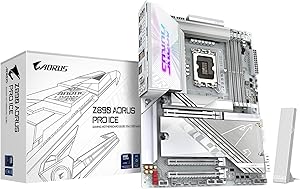
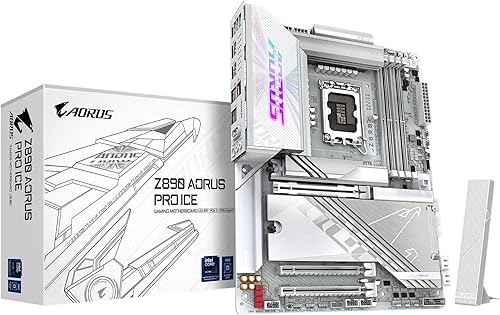
Gigabyte Aorus PRO ICE - If you have not seen any of these ICE boards offered by Gigabyte then you are in for a real treat. These are high end boards from Gigabyte and it shows! The PCB is white, connectors are white, silver accents... this thing really feels at home in an "ICED OUT" build!
The Z890 variant I have comes with an enormous amount of connectivity via 10 (!) USB Ports, 2 Thunderbolt 4 Type C with DP, WiFi 7, and 5G LAN! Huge VRM Heatsinks for stable OC, 4 DIMM Slots, 3 PCIe Slots, Internal HDMI for those internal LCD panels, RGB Headers, 8 PWM Fan Headers, Front USB 3 connectivity and 5 m.2 slots... the list goes on! This is a fully featured chipset motherboard.
The really special items on here is the heavily reinforced PCIe GPU slot, this is surrounded by metal, cushioned with rubber AND anchored to the back with a plate that spans the entire slot! This is WAY more structure than you see on most "armored slots" on the market. This may sound silly, but with GPUs in the 50 Series weighing 2-4Kg... this is not a bad thing to have on your motherboard! They also extended this treatment to the two main DIMM Slots... while not as reinforced, they are nicely armored to prevent damage or bending.
Z890 is for the new Intel Core Ultra 200 series, I paired mine with the 265K and this thing is a beast! Runs cool and rocks productivity! Once all the latest drivers and firmware was rolled out, this thing REALLY started pushing even more! Intel added more PCIe lanes so that you dont have to sacrifice as much as other brands or platforms when using a PCIe 5 NVME and GPU. Which is think is underrated. You really need to keep track of where your board and platform bifurcates its PCI Lanes from direct CPU and the chipset.
So far this has been an extremely stable board for me, I can't say enough about the Stability, because all of the above is nothing if the board does not keep your system in check and trouble free. I have run FOUR DIMMS of 6400 DDR5 on this board with perfect stable timings. Gigabyte even offers you an "AI OC" option that will test and suggest the best overclock for a stable system, you can also do this with your CPU OC as well as GPU (if you own a Gigabyte GPU, which you should!).
I have included a photo of the ICE BEAST as I like to call it. Along with plenty of great MoBo photos to get you excited.