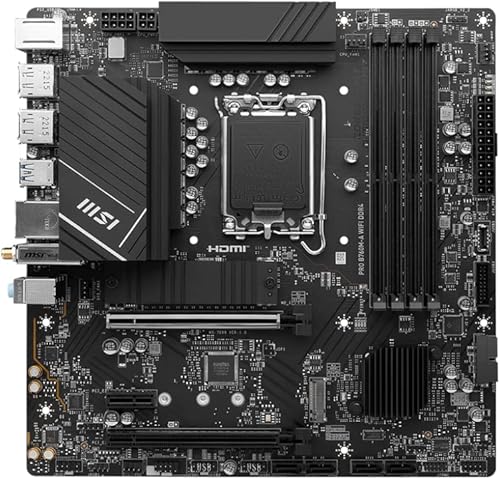
* Memory Speed is the max supported by this motherboard. Actual speed also depends on your CPU's memory controller and RAM kit rated speed.
PERFORMANCE
77%
Customer Reviews★★★★★4.8 · 5 reviews
★★★★★Reliable and Future-Proof – Great Value Motherboard for Intel Builds
The media could not be loaded. https://m.media-amazon.com/images/I/E1LRwiR7-eL.mp4 https://m.media-amazon.com/images/I/61xuLZPNYVL._SY256.jpg ⭐⭐⭐⭐⭐ Stable, modern, and future-ready
I’m very satisfied with this motherboard. I bought it to build a PC with a 13th Gen Intel processor and everything worked perfectly right from the start.
🔹 Highlights:
• Compatible with 12th, 13th, and 14th Gen Intel processors (LGA 1700 socket).
• Supports DDR4 memory, great if you already have RAM from previous builds.
• Modern connectivity: PCIe 5.0, Wi-Fi 6E, Bluetooth 5.3, and USB 3.2 Gen2 ports.
• Comes with HDMI and DisplayPort, perfect if you’re using integrated graphics.
• Includes 2.5Gbps LAN, ideal for fast and stable network performance.
• mATX form factor, perfect for compact cases without sacrificing features.
BIOS is easy to update, installation was simple, and the build quality feels solid. It’s a great choice for anyone looking to build a powerful, modern, and reliable system without overspending.
✅ Highly recommended for gamers, creators, and demanding users.
eduard ortiz florez · 2025-07-17 · via amazon
★★★★★Works well for this price point, had to tinker with USB for Win11 install
Pros:
- This works out of the box for Raptor Lake 13th gen Intel. That, in itself, gives it 5 stars compared to other boards that I tried to get Raptor Lake on which failed. What I really wanted to work was the B660M-A MAG Mortar Max with Raptor Lake but alas that failed the test whereas this board (Pro series B770M-A) works.
- Small form factor (micro ATX)
- Easy to install for M.2 drives
- Picked up all of the peripheral items (SATA, M.2, RAM) successfully
Cons
- The quality of materials for heatsinking isn't quite as good as the MAG MORTAR MAX series. However, this board works with Raptor Lake whereas the other board does not so unless you are building Alder Lake this PRO series is the one to use for micro ATX. The MAG MORTAR series is a heavier motherboard because more materials are involved whereas the PRO series is mostly plastic (lighter weight and it works but not as high quality of material).
- When installing Windows 11 by USB stick I received error code: 0x8007025D and Error code: 0xC0000005. The workaround for that was to use the rufus tool and the "WindowsToGo" feature to flash a Windows image onto the SSD itself. I put that on to the D drive SSD, then booted from the D drive SSD (rather than booting from USB stick), and had the D drive image the C drive SSD with Windows 11. In that way, there was no need for a USB stick but I did need to use an external SSD reader to put the Windows 11 ISO file onto drive D and then boot from drive D in order to get drive C working. Thereafter, everything worked fine.
- If you plan on using SATA drives the one drawback with this board is that the SATA ports are so close to the edge of the board that in some cases it is hard to plug in the SATA cable into. In my setup the M.2 drives were easy to install but I also had 2 SATA devices and the cables for SATA took a while to plugin because in my case there was little room between the case edge and the port that you put the SATA cable into. I made it work but took some time.
Overall I am happy with this board because it works. Some work involved with the rufus Windows2Go step above but I am happy with this purchase. I am still bummed that I couldn't get the same to work on the MAG MORTAR series because that had higher quality components on the motherboard but hey... it finally worked and that is 5 stars in my book for this PRO series motherboard.
Amazon Doug · 2023-02-19 · via amazon
★★★★★Good, quick delivery.
Easy to hook up and run, works great and got a good deal. Next day delivery from prime was nice as well.
Brenden Crow · 2025-07-13 · via amazon
★★★★★No Issues
Excellent board with many features. I needed 3-4 monitor support and this delivers. 14th gen CPU no problem. Be sure to use an active DP adapter if you use these display ports to an HMDI input. Passive adapters wont work like they do on PCIe GPU's.
Brian A · 2025-01-06 · via amazon
★★★★★Very high quality board. Works with Linux and i5-13600K
This board is very nice. Linux (Ubuntu Jammy) installed just fine. I did not try Bluetooth or WiFi, but the audio, ethernet, video, and hardware monitoring (CPU and NVME drive temperatures, etc) all worked.
The i5-13600K runs great on it, though it is recommended to tweak the CPU Lite Load values down a bit to get cooler temperatures without sacrificing performance.
One major issue I had. The M-Flash BIOS update over USB just did not work. I tried EVERYTHING. 9 different USB sticks of varying size. Tried in all 8 ports (the 8 in the rear and the two in the front panel). FAT32 vs NTFS. Putting the BIOS file in the root directory. Putting the BIOS extracted folder in the root directory. The motherboard just refused to recognize it. Finally, I got it to work by putting another M.2 NVME drive into the motherboard, formatting it to FAT32, sticking the BIOS file in there, and running M-Flash. This finally worked as M-Flash found the drive with the BIOS file. So crazy that the only way I got it work was not even a documented method. I may keep a FAT32 partition on one of my drives to do BIOS updates in the future, since I doubt I will ever get the USB sticks to work.
If it wasn’t for the BIOS issue, I would have given this 5 stars, but I had to knock a star down for wasting me hours.