Corsair K100 RGB Mechanical Gaming Keyboard - Cherry MX Speed RGB Silver Keyswitches - PBT Double-Shot Keycaps - Elgato Stream Deck and iCUE Compatible - QWERTY NA Layout - Black
/
⌨️
1 results💡 How to pick a keyboard
What to look for:
- Switch type (linear for gaming, tactile for typing)
- Layout (full-size, TKL, 60%, 75%)
- Wired or wireless with battery life
💰 Try switches in person if possible. Hot-swappable boards let you change later
FILTERS
🔍
SORTVIEWProductSwitchesLayoutWirelessValuePrice
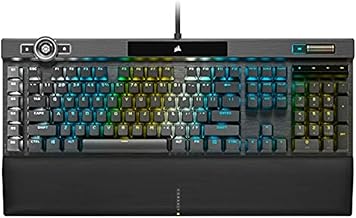
Corsair K100 RGB Mechanical Gaming Keyboard - Cherry MX Speed RGB Silver Keyswitches - PBT Double-Shot Keycaps - Elgato Stream Deck and iCUE Compatible - QWERTY NA Layout - Black
Corsair★★★★★4.5🔥 DEAL -$40
—
—
—
—
$289.99
$250.41
Specifications
addedAt2026-05-15T16:31:54.608Z
sourceamazon-discovery
Customer Reviews★★★★★4.8 · 5 reviews
★★★★★Fast light-touch-typing with extra macro keys and knobs, and fully programmable RGB lighting
Very smooth, love the light touch typing feeling of Cherry MX Speed, extra keys and buttons and knobs, and fully programmable RGB. I have been using Corsair K95 Platinum with Cherry MX Speed for 7 years and I needed another RGB mechanical keyboard for another PC, so I opted for Cherry MX rather than OPX so I don't have to get acclimated to new type of keys and swapping between Cherry MX and OPX when I move between PCs. I'm sure that if I haven't used Cherry MX before, I would have chosen OPX. I also used Cherry MX Brown, but I prefer Speed once I got used it. Although pricey (especially compared to Corsair K95 at the time I bought it), I took advantage of a sale. I couldn't find any mechanical keyboard that comes close to this one in terms of functionality and quality and programmability, especially the six macro keys on the left side I can't do without (I also considered Corsair K70 but they don't have macro keys). This mechanical keyboard is such a delight for gaming, coding, typing, etc. I use this on a Mac and Linux. Linux has ckb-next driver, and its development version (newer than release version as of Nov 2025) also detects the top left scroll and can program RGB on it. I created my own custom RGB lighting by copying one of the animations and then changing all the configurations to my liking. I use the USB port to connect my wireless mouse dongle and it works perfectly even if routed through a USB hub with on/off switches, then a USB KVM switch, and then through a third USB hub that is externally powered. If you are using a USB switch with mouse/key roaming feature that only works with a standard keyboard, there is a way to change the keyboard mode into BIOS mode by pressing some keys (search the Internet since it's not mentioned in the manual). You'll have to connect the mouse directly to the USB switch instead of the keyboard. You can revert back to normal mode with full functionality using some other key presses if you no longer need to be limited by a USB switch with key/mouse roaming feature. The wrist rest is very comfortable. It's nice that it's magnetically attached. The one in my old Corsair K95 had the plastic tabs broken so I had to throw it away. You probably won't find any alternative that comes close with macro keys, full custom RGB lighting, good quality, and the smoothness of a linear mechanical keyboard. If you've never used linear short activation switches, it may take some time to get used to it, but once you master it, you won't want to use any other switches. YMMV though.
Ide · 2025-12-01 · via amazon
★★★★★Amazing Product - Best keyboard I've ever owned
TL;DR - 10/10. Premium price, but premium quality in return. I will admit that I was a little hesitant about getting a wireless keyboard, mostly because of battery life and dropped connections. My job sometimes requires me to act quickly to fix an issue, and I was worried about the connection suddenly dropping when I was racing against the clock. I had a Corsair K70 and loved it, but it was getting old and had started acting up on me so I thought I would take a shot on this one. Oh boy, am I impressed. The keys feel incredible, the battery life is fantastic, and the connection is solid with no noticeable input delay. The "Slipstream" wireless receiver can pair multiple Corsair products as well, so you don't need to take up multiple ports if you like their product line. Pros: - Battery lasts me several days, working 8 hours a day and typically gaming or browsing for a few hours on top of that. I usually leave the RGB lighting on the highest brightness, so you could get even more life out of a single charge if you turn it down/off. I haven't checked charge time from 0-100%, but it charges fast enough that it doesn't matter to me personally. - The connection is solid. I'm about 10 feet from the dongle with my body, desk, and other equipment in between and have no noticeable input delay or dropped inputs. - The feel of the keys is amazing. I know this is more of a subjective matter, but I think they have just the right amount of "click" and feedback. They're a little less "clicky" than the Cherry MX Red switches that were in my K70, but still tactile enough to feel just right. - If you're also using a Corsair wireless mouse or headset, they can all pair with a single "Slipsteam" dongle so you're not taking up multiple USB ports with different receivers. I imagine this also cuts down on the interference that would be caused my having multiple wireless receivers next to each other? - Multiple connection modes - wireless, wired (while charging), and bluetooth with up to 3 pairings. Switching between connection modes is as easy as pressing FN+[corrosponding key]. - Premium quality in every category that I can think of. Cons: - If you don't already have/use it, you'll need the Corsair iCue software to control many functions of the keyboard. I don't like having so many different pieces of software to control my system, but it's practically unavoidable. Luckily, iCue isn't one of those "in your face" pieces of software. It runs at startup without any popup or loading screen, and simply sits in your system tray until you need it. - Expensive, but you honestly get what you pay for. - That's it. I have no actual complaints, I love this thing.
Garrett · 2022-12-05 · via amazon
★★★★★Edgy, great feel, quiet, super connectivity. Lighting is so-so
This is a crisp, well crafted keyboard with a great feel but I wouldn't get it for list price The K100 is definitely 'edgy'. It's got a super thin profile that looks and feels 'upscale', and what makes that work are the low-profile Cherry MX switches. For typing, they are outstanding. They aren't perfectly quiet, but they're a lot quieter than most mechanical keyboards. The feel is _great_. The short stroke, coupled with the mechanical feedback, means you barely tap the key and yet get this solid feedback that yes, you typed that key. Each key is gently scalloped as well, so finger placement is reinforced and touch typing is instinctive, and the fast poll rate means there is no lag at all. The layout is basically standard and the extra keys are easy to use. The volume scroll bar/wheel is a little too small but that may be limited because of how thin the keyboard is. The keyboard indicators (caps lock etc) are on a display top center. The display is a little uninspired, and the indicators are definitely too small and hard to see. Connectivity is outstanding. I am running wired, wireless and BT connections simultaneously and they are fairly seamless to switch. The BT isn't as good as their own dongle but it works, and it lets you switch super fast with dedicated switching keys, so much that it's almost like having a built-in KVM. Oddly, it is in the gaming space where it's weakest. The lighting is, well, uninspired. You'd think "sweet, per-key lighting!' but despite lots of controls in the app, truth is iCue has the same boring stock animations that you get on a cheap $15 RGB keyboard. And I can't even use audio? Because apparently the iCue audio plugin only works with Corsair's headset? That's just awful, and the overall look is pretty plain. So annoyances aside, this is a great keyboard. A typist's keyboard with a fast, great feel. Build quality is perfect, even the box is upscale. But is it worth it? At a list price north of $300, maybe not. If you want an elegant, understated look for the executive suite, this is perfect. But if you're pricing for a great keyboard with top-of-the-line gaming chops, the lighting needs to be better than this.
Tec · 2026-04-02 · via amazon
★★★★★Corsair's best keyboard thus far.
I've owned tons of Corsair's previous keyboards starting with their early monocolor white led k95 to the various other iterations of the K70 and K95 that were released over the years. I've always had some issue with them that made me hope that it would be fixed. The first K95 had problems with the black on the keycaps wearing off and the led lights dying quickly. Later RGB versions seemed to fix the LEDs dying, but introduced issues with a single key press registering multiple keystrokes. Then the quality of the keycaps of newer releases seemingly degraded and were completely loose out of the box. So loose that if you tapped a key too quickly, the keycap would fly off the board. That got old very quickly. Then the K95 RGB Platinum also had the issue of some of the LEDs starting to become really dim compared to the other keys. I switched to the EVGA Z20 after I got fed up with the various issues, but found it had its own host of problems including random disconnecting from the computer and losing power regardless of what USB port I plugged it into. I discovered that Corsair had a new keyboard with a new type of optical switches and decided to give their keyboards one more chance. After some months of use, I have to say this keyboard is fantastic so far and all my previous issues with their keyboards appear to be gone. - The keys feel just right when typing. - The fonts used on the keyboard look a lot better and the keyboard overall has a classier look to it. - The keycaps are not loose in the slightest. They are snugly fitted to the switches and actually takes a bit of effort to pull them off so I'm not worrying about them flying off the keyboard anymore mid-game or while chatting. - There hasn't been a single instance of a single keypress registering multiple keystrokes. So far, the LEDs for these OPX switches have been holding up over the months and I hope they stay that way. - The keycaps are double shot so I don't have to worry about the paint on the keys coming off. - Not really a past issue per se, but perhaps due to the new OPX switches, it's not as loud when the keys bottom out while typing compared to the Cherry MX switches. An improvement in my opinion, but some people might prefer the louder clickety clack of the Cherry MX switches. As an added bonus, the wrist rest is also their best yet. It must use a memory foam inside as it has yet to flatten out even after applying a lot of pressure on like resting my elbows on it frequently. It's a huge improvement over the hard plastic wrist rests with the rubberized coating. It also conveniently snaps right onto the keyboard with magnets. If I were to list any cons, they would be: - Price. This is one expensive keyboard. I have had no issues with it so far, so I'll take it over having a cheaper keyboard with problems. - Easy to accidentally press a key if you're not careful as they are linear and don't require a whole lot of force. Also, they have a VERY short actuation distance. - I find the scroll wheel to only be mildly useful, but that's just my based on my own needs and usage.
Jeff L. · 2021-11-26 · via amazon
★★★★★Good but not perfect
UPDATED 2022-11-17: After using the keyboard for a few days, I'd say this is a pretty good keyboard. I do not have any data on battery usage yet. The keyboard lighting effects are very nice and highly customizable. This being said the keyboard has a few areas for improvement: - unlike the other keys, the volume control wheel does not keep the keyboard alive. So if you watch youtube videos for 15 minutes using only the mouse and the volume wheel, at some point the keyboard will go to sleep mode, and the volume wheel will stop working completely (until you press another key to wake up the keyboard). - it does not seem to be possible to assign a key to launch an application (say the Windows calculator) using the "Hardware Key Assignments". This is possible using "Key Assignments" but this won't work if you use an A/B switch and your alternate computer is not running the iCUE software (unlike lighting effects which work in "Hardware lighting" mode). My old Logitech Wireless Solar Keyboard K750 could launch the Windows calculator from anywhere. - one major design issue which I initially thought was a bug: if you save your lighting profiles using the iCUE software to the keyboard slots, it works but only as long as your keyboard is connected to the same computer. If you use an A/B switch to toggle to a different computer, the keyboard does not retain its settings on that other computer. This is because the iCUE software is using different profiles if the keyboard is connected wirelessly or with the USB cable, but you cannot copy the wired profiles onto the wireless profiles. You have to recreate them one by one. Not a bug, but a major usability issue especially because the "Lighting library" is also not sharable between the wired profiles and the wireless profiles! - also if you use an A/B switch to toggle between two different computers, there is some lag for the keyboard to switch over (longer than what I had with my previous keyboard). - macro replaying seems to be real time. So if you pause while recording the macro it will also replay the macro at the exact same slow speed. This may be good for games where timing is everything but not so much for software development. This is probably by design but it would be nice if this was configurable. Also, you have to be very careful about macro recording (don't do what I did by mistake to assign a macro to the Windows key, because the Windows lock key is also used to record macros!) - Keys are a little noisy (compared to a keyboard like the Logitech Wireless Solar Keyboard K750) - The Shift keys are represented with an arrow pointing up to access characters showing at the bottom of the keys. This is unlike most keyboards and can be confusing. Design blunder? - it is not clear if the on-board battery is replaceable, possibly reducing the keyboard longevity. The keyboard appears to be locked sealed, without any screws. - Keyboard itself is entirely black. Style would greatly benefit to have a little white rim all around, similar to the Logitech Wireless Solar Keyboard K750. In a minor note: - Product manual is downloadable via a QR code, but who has a QR code reader on a computer? - iCue software is 1.1GB to download - the predefined quick lighting zones in the iCue software are lacking. You have to create them (e.g, "Function keys", "Numeric keypad", etc...). - it would be nice if the keyboard could switch profile automatically based on the time of the day (i.e. to a different lighting when it is dark at night for instance) Overall it can be a nice addition to any computer, in spite of the high price tag, and the couple usability issues (fixable). There is hope these will get addressed (including the macro recording timing and the volume control wheel) in a next software/firmware update... Note: I probably should get this keyboard for free in view of the QA work done for Corsair! What say you?
Jenny · 2022-11-12 · via amazon
Buy Now
Amazon
✓ In Stock
$250.41
Buy →
Best Buy
Not tracked at this retailer
💰14% off
Below MSRP
Was $289.99 → $250.41